
- Client
- Gastrogonia Delicatessen
- Status
- Live on gastrogonia.gr since October 2026
- Service
- Web Development
- Sector
- E-commerce
- Stack
- Django · Python · PostgreSQL · Redis · Celery · Docker · GitHub Actions · Nginx · Nexi XPay · DHL Express API · Claude Code
- Live site
- gastrogonia.gr (opens in a new tab)
Counted, not estimated
- days from the first commit to launch
- 74
- commits on the main branch
- 260+
- automated tests, run on every code change
- 7,100+
- database migrations, applied automatically on deploy
- 120
- colour palettes the owner switches herself
- 9
- from git push to live, through CI
- ~10 min
01 · The brief
A neighbourhood delicatessen that ships across Europe
Gastrogonia is a delicatessen in Nea Ionia, Athens: cheeses, charcuterie and pantry goods from small Greek producers. Since 2010 it has travelled to every corner of Greece to meet producers and see how each product is made, and only what stands out reaches its shelves. For more than 15 years customers have trusted it for the quality of its products and its service; today it sells over the counter and ships across Greece and the EU, and every order is packed with the care of a parcel for family.

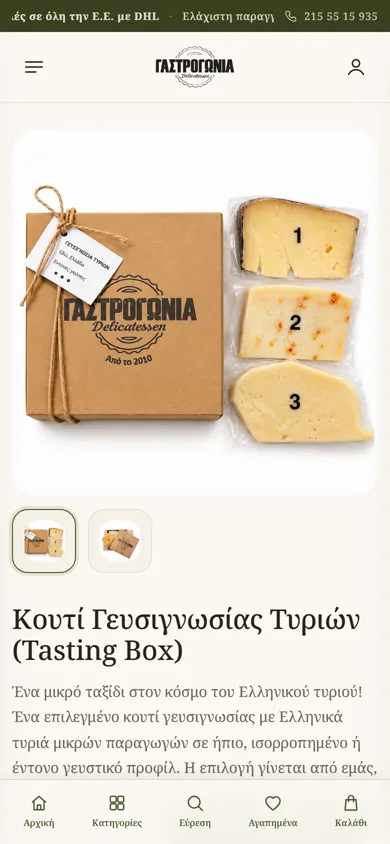
The old shop ran on WordPress and WooCommerce, held together by a theme and plugins that could not be shaped to how a delicatessen actually sells. A cheese comes in 250 g, 500 g and 1 kg cuts, each with its own price and stock. Customers want to filter by milk, texture and region. Fresh products travel in insulated boxes with ice packs, Monday to Thursday only, and a parcel to Berlin is priced differently from one to Volos.
It went live on 3 October 2026, 74 days after the first commit. Customers kept their passwords and order history, and old addresses redirect to the new pages.
02 · How we built it
Engineers in charge, AI agents treated as untrusted contributors
Gastrogonia was built by the JNS team: engineers with experience in production systems for the public sector and EU institutions, who bring the same discipline to every project, from a government payments system to a neighbourhood delicatessen. They worked with Claude Code, Anthropic's coding agent, running locally on our machines. Our engineers set the direction and make every decision; the agents write most of the code. A typical change does not go to one agent: Claude Code acts as an orchestrator, splits the work into packages, and hands each package to its own implementation agent working in an isolated git worktree, so several parts of the shop are built in parallel without stepping on each other.
The part that makes this work is not the writing, it is the checking. From the project's first week on, every change has been reviewed adversarially before it is committed, by separate reviewer agents that did not write the code and share none of its context. Their job is to break it: find the order that gets the wrong shipping price, the form that silently loses a field, the security hole. A separate verifier then checks every fix the implementers claim to have made. Findings go back for another fix round, and the review runs again, round after round, until it comes back clean. Only then does one of our engineers sign it off.
What the reviewers caught
- A full bypass of the staff two-factor login: with only a password, an account's email (where the 2FA code is sent) could be changed. Found by an independent review round and fixed; the next round found that one of the fixes let any customer use up the hourly security-alert allowance, and that was closed too.
- A fix in one round that silently switched an order going abroad to Greece, with free Greek shipping. The second review caught it before it ever reached a customer.
- On the DHL integration, 49 findings from six independent reviewers, 47 fixed, and a verifier that caught the fixing agent claiming a fix it had not made.
- On the card-cancel flow shipped on launch day, three independent reviews and 74 deliberate code mutations, 73 caught by the tests (the last one provably cannot change behaviour).
The owner's requests arrive the way a shop owner works: a list of points in Greek with screenshots from her phone, one round of 55 points with 25 screenshots. Those become parallel work packages, each verified in a real browser at phone and desktop widths before anyone is asked to look at it. The project keeps a living memory (decisions, incidents, traps and lessons, around 3,000 lines across a few files) that every new agent session starts from, so the project's memory never depends on one person or one conversation.
03 · Design system
A design system first, then pages
The storefront started as a full interactive prototype made with Claude Design, then ported to the Django templates with its tokens intact: olive, terracotta, gold, ink and paper, one serif typeface for every heading and paragraph, and a spacing and motion system that every component reads from. Every colour in the storefront stylesheet comes from a token; a test fails the build if a raw colour appears there outside the token block.
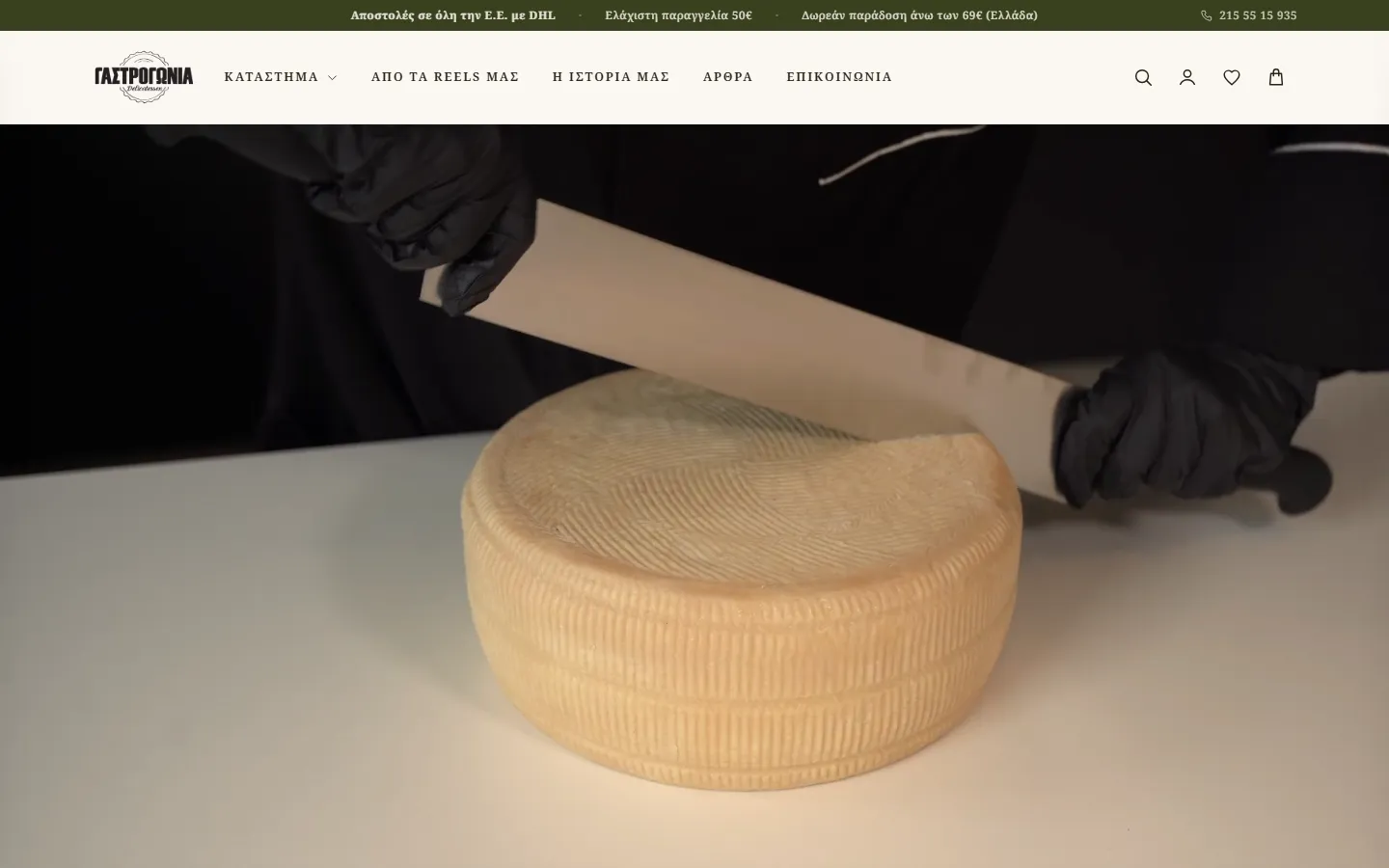
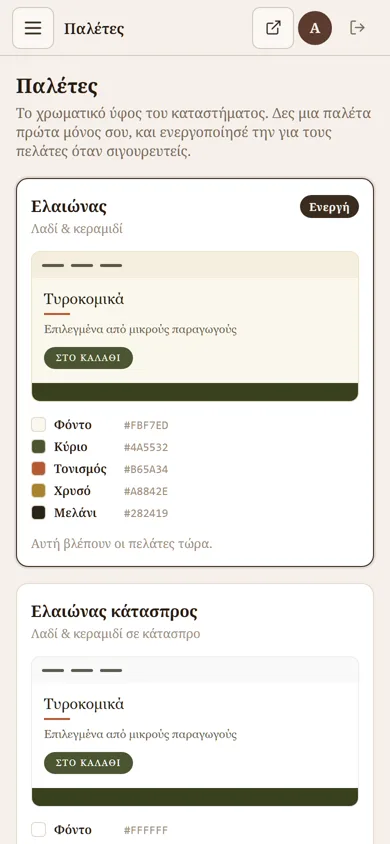
Because colour is tokens, the owner can change the whole shop's look herself: nine ready-made palettes, including near-white variants of the house olive palette, switch from the management dashboard with a preview before anything goes live. On phones the shop behaves like an app: a bottom tab bar for Home, Categories, Search, Favourites and Cart, thumb-sized controls and a checkout that fits one hand.
04 · The storefront
Built around how people buy cheese
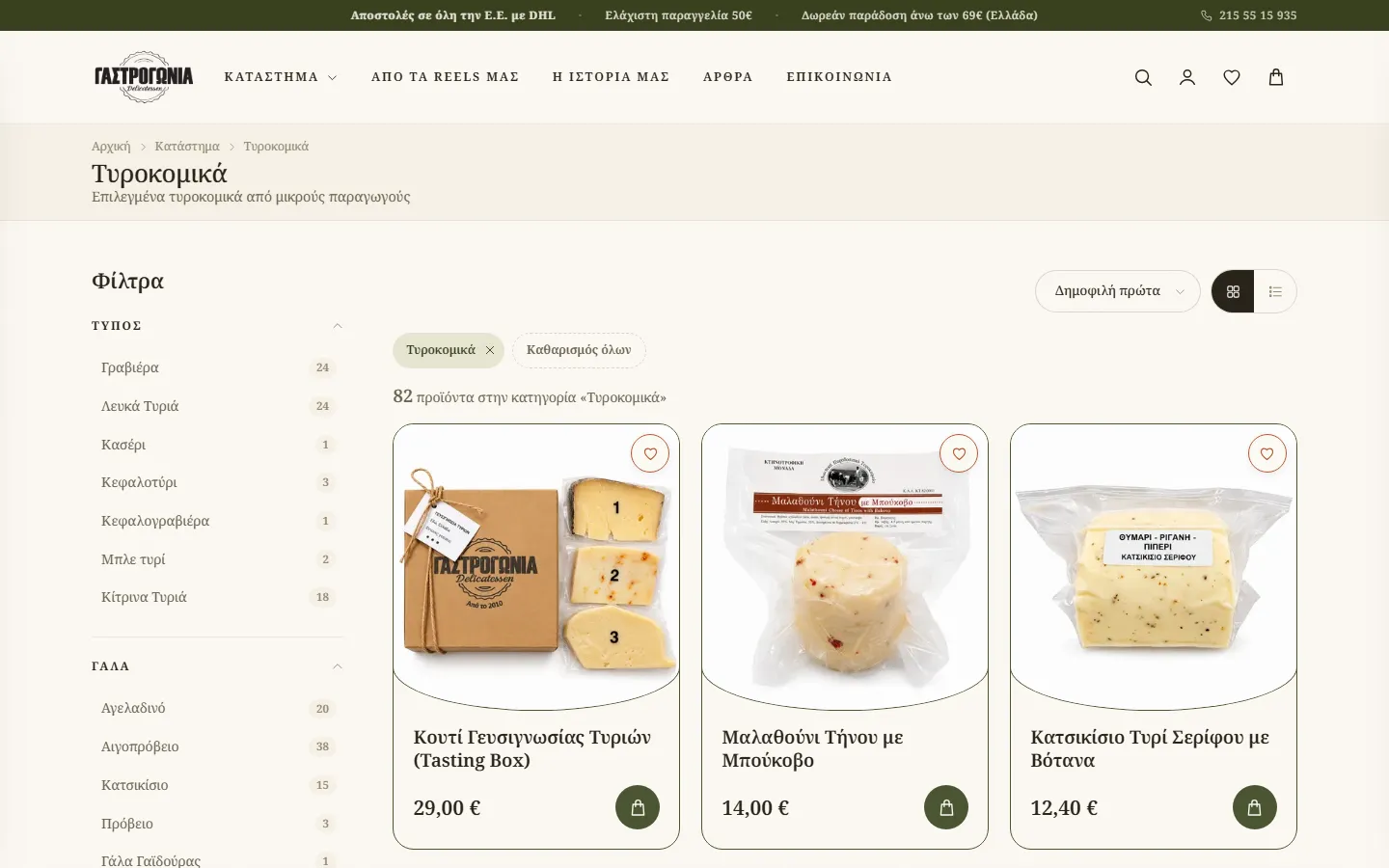
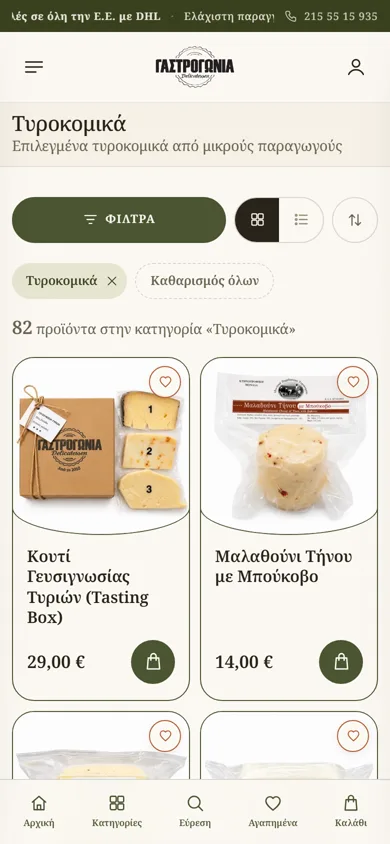
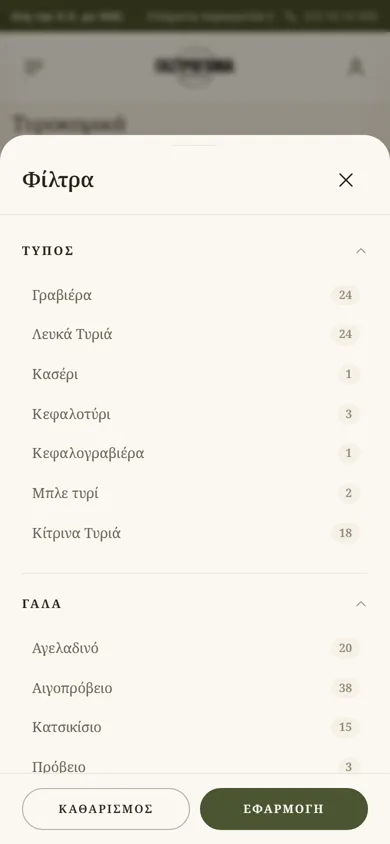
- Products in several sizes, each with its own price, stock and shipping weight, and an optional vacuum-packing add-on per piece.
- Filters by type, milk, texture, meat and origin, which the shop creates and edits from the dashboard, with a preview of exactly which products a change affects.
- Live search with suggestions as you type.
- "From our reels": the products shown in the shop's TikTok videos, collected in one place.
- A cheese tasting box: before it goes into the cart the customer picks a taste profile and what to leave out, and the shop builds the box to match.
- Digital gift cards: emailed to the recipient as an illustrated card with the sender's message, no expiry, spendable across several orders.
- "Notify me" on sold-out products: one email when it is back, no account needed.
- Customer accounts with order history and one-tap reorder; a gift-note option written by hand on a card.
- The storefront texts, from the home page to the checkout notes, editable by the owner without a deploy.
Pressing play loads content from Instagram (Meta), as described in our privacy policy.
Open the reel on instagram.com (opens in a new tab)05 · Management dashboard
A management dashboard for every part of the shop, on a phone too
The WordPress back office was replaced by a management dashboard designed around the shop's daily work: products, orders, shipping, payments, texts, look and security, all from one place, and it works on a phone as well as on a desktop. The rule we held to: anything the owner might want to change is data she edits, never a constant only a developer can touch. Where a change has consequences (re-classifying products, switching a palette, changing filters), the screen shows exactly what will happen before it saves.
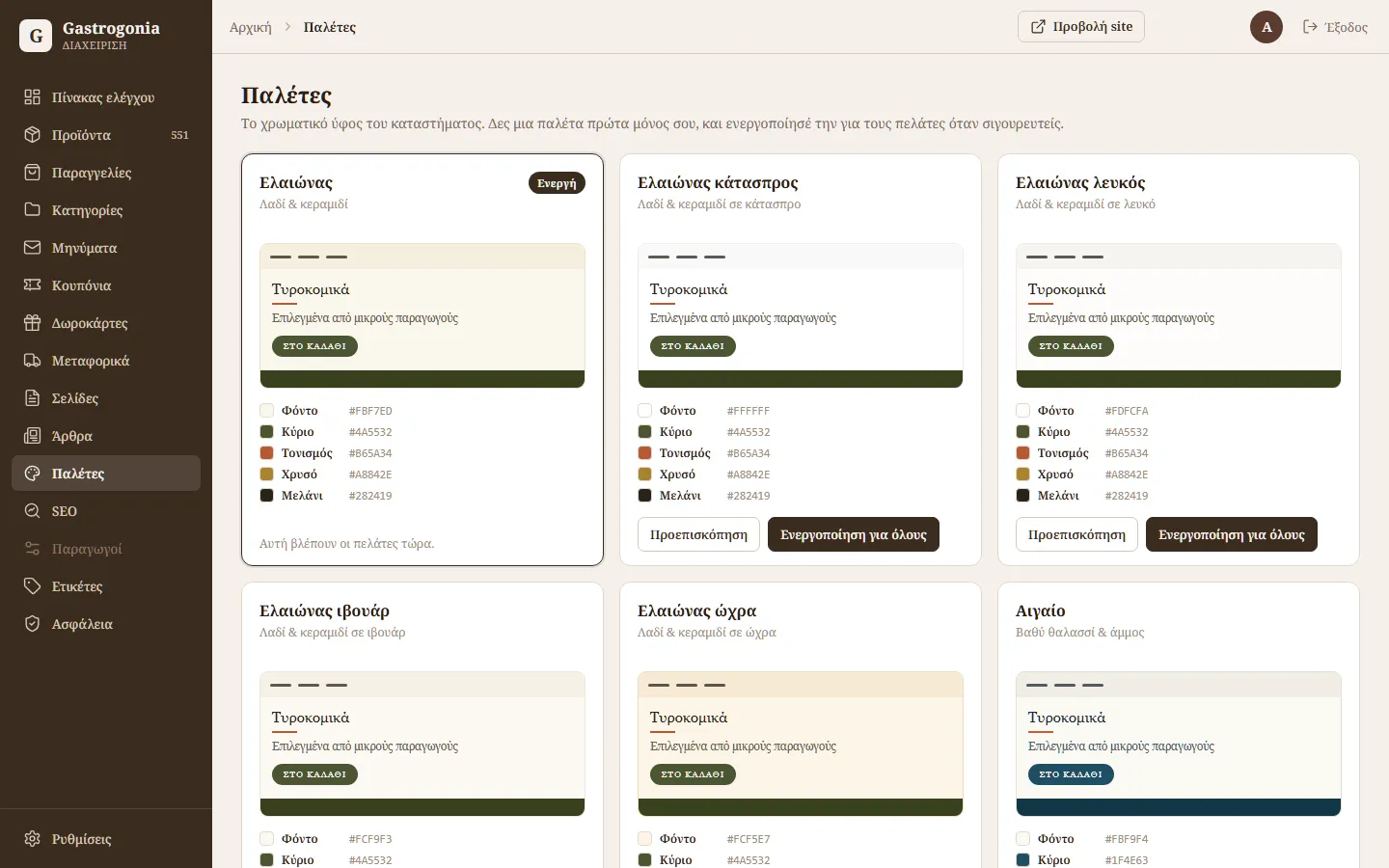
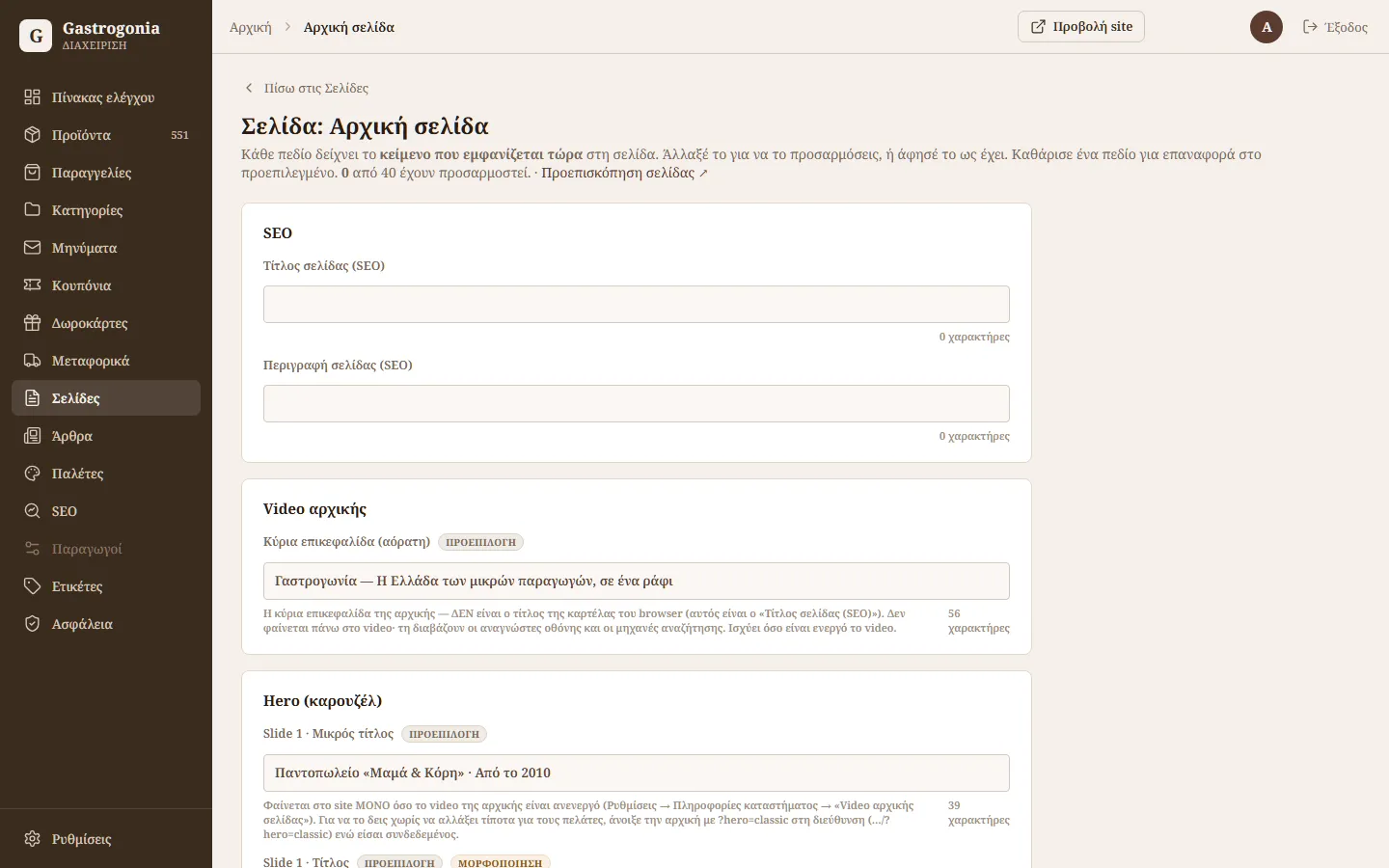
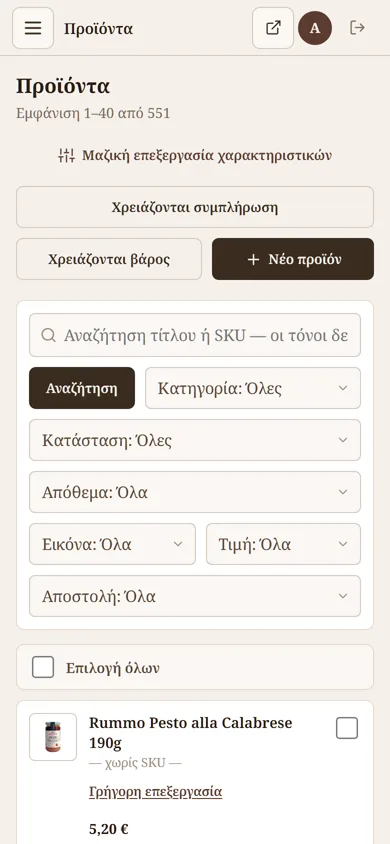
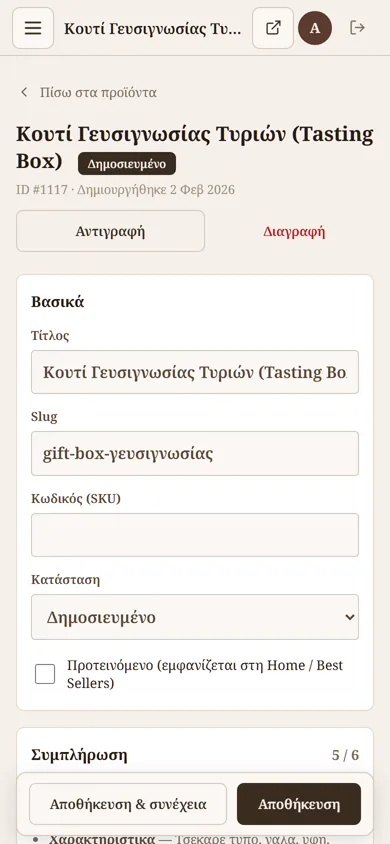
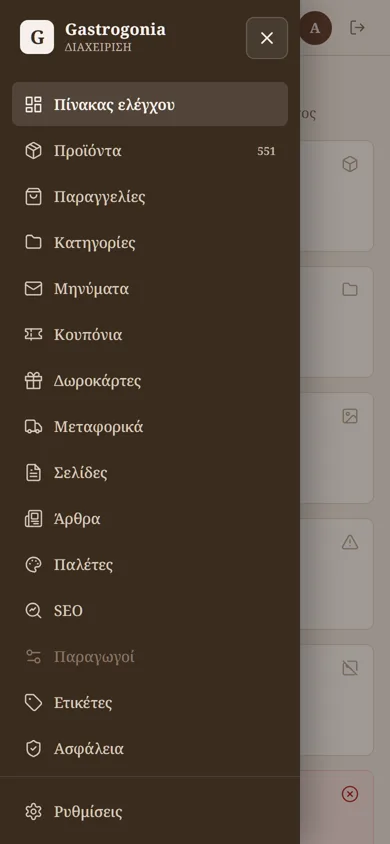
- Products, sizes and stock; categories and tags; a media library with fingerprinted file names so a replaced image is never served stale.
- Orders with statuses, notes, refunds and re-sent emails; coupons and gift cards.
- Shipping zones and rates, product weights, DHL and courier settings, with a connection test.
- An SEO manager: per-page titles and descriptions, redirects and a log of missing pages.
- The home page video, palettes, cookie banner texts, legal pages and the storefront texts.
- A security screen: firewall rules, blocked addresses, the security log and alert recipients.
06 · Architecture
Proven technology, on purpose
A shop that takes money should be built from parts that have been reliable for a decade. Gastrogonia is a Django 5.2 application, the long-term-support release with security fixes until April 2028, on PostgreSQL 16, with Redis for cache, sessions and the job queue, and Celery for everything that should not keep a customer waiting: order and gift-card emails, back-in-stock notices, clearing stale orders and expired shipping quotes. It runs in Docker on a virtual private server behind Nginx, with Let's Encrypt certificates that renew themselves.
Built with
Application
- Python 3.12the language of the whole back end
- Django 5.2 LTSstorefront, dashboard, APIs
- Gunicornapplication server
- HTML & CSSserver-rendered pages, design tokens
- JavaScriptinteractions, no framework
Data and background work
- PostgreSQL 16all shop data
- Redis 7cache, sessions, job queue
- Celeryemails, scheduled jobs
Infrastructure
- Dockerevery service in a container
- NginxTLS, static files, reverse proxy
- Let's Encryptcertificates that renew themselves
- Ubuntu 24.04server operating system
Quality, security and monitoring
- GitHub ActionsCI/CD: checks, tests, deploy
- Playwrightreal-browser tests
- pip-auditblocks known vulnerabilities
- Dependabotweekly dependency updates
- Sentryerror tracking, personal data scrubbed
- UptimeRobotindependent uptime checks from outside
- Telegramalerts through our own Telegram bot
Integrations
- Nexi XPaycard payments, 3-D Secure
- DHL Express APIlive EU shipping rates
- Geniki TaxydromikiGreek courier: vouchers, tracking
How it was built
- Claude Codeorchestrated coding agents
- Claude Designthe storefront prototype
- Anthropic Claude modelsimplementers and reviewers
- GitHubcode, reviews, history
Technology marks from Simple Icons (CC0). Trademarks belong to their owners.
07 · Payments
Card payments with Nexi, verified twice
Cards are taken through Nexi XPay's hosted payment page, live since launch, for Visa, Mastercard, Maestro, Diners and Discover. Card details are entered on Nexi's page with 3-D Secure and never touch the shop's server. The amount is always computed on the server, never taken from the browser.
- Nexi returns a one-time security token with each payment page, and the shop stores it with the order; a notification is rejected unless its token matches, compared in constant time.
- The notified amount must equal the saved order total, and the shop asks Nexi about the order once more before marking it paid.
- Repeated notifications are harmless: a duplicate success changes nothing, and a late failure notice can never un-pay a paid order.
- Testing against Nexi's real sandbox (not a mock) found that Nexi rejects order numbers in Greek characters; payments now carry a numeric reference.
- A customer who cancels or whose card is declined returns to the checkout with the cart, coupon, gift card and details exactly as they were.
08 · Shipping
A shipping engine built for DHL and Greek couriers
Shipping is its own engine. Every size has a shipping weight, packing adds the box once and applies volumetric weight, and a single service asks providers for the price in order. For addresses outside Greece the first provider is the DHL Express API (MyDHL): the customer chooses road or air, and the engine asks DHL for a live rate for that parcel and country.
- Every DHL failure (network, timeout, bad response, rate limit) becomes "rate unavailable" and falls back to the shop's own zone table, so DHL being down can never stop a checkout. A circuit breaker stops calling DHL after repeated failures.
- The quote a customer sees is locked to a hash of the cart, destination and weight; if any of them changes, the shipping is re-priced before payment instead of being silently accepted.
- DHL's services can be renamed, reordered and switched on or off from the dashboard; credentials are encrypted at rest and there is a connection test.
- For Greece, an integration with Geniki Taxydromiki: vouchers and labels from the order screen, automatic end-of-day closing, hourly tracking and a public tracking page.
09 · Security
Security built into the shop, not added later
WordPress shops rely on a security plugin. We built the equivalent into the application, so it is tested and reviewed like everything else, and we watch the running shop so that problems reach us before they reach a customer.
Inside the application
- A firewall with IP block and allow rules, automatic temporary blocks for brute force and for floods of missing pages, and an append-only security log.
- Login protection with fixed limits per account and per address, on sign-ups and password resets too.
- Two-factor login for staff with an authenticator app (Google Authenticator, Microsoft Authenticator and others). The secret is stored encrypted, each code works only once, attempts are limited per account and per address, one-time recovery codes cover a lost phone, and the owner is alerted the moment a new device is linked.
- Django's built-in admin panel moved to a secret address.
- Security alerts by email, instant for critical events, capped per hour, with a daily digest for the rest.
- Rich text from the editor sanitised against an allowlist; uploaded videos checked by their actual bytes, not their file name.
- Payment and courier credentials encrypted at rest; secrets live only on the server, never in the code.
- HTTPS everywhere with HSTS, secure cookies and strict content-type headers; every deploy runs Django's production checks, and any error stops it.
- The application server sits on a private network shared only with the shop's own containers, and the shop's proxy accepts requests only from the front web server, which signs each one with a secret key. Other applications on the same server can reach the shop only through the public front door, like any visitor.
Dependencies and monitoring
- Django 5.2 LTS, the long-term-support release, so security fixes keep coming until April 2028.
- Every deploy audits the Python dependencies, including indirect ones, against PyPI's public vulnerability data and stops if any known vulnerability is found. The same audit runs every Monday even when nobody has pushed, because new advisories are published every day.
- Dependabot proposes dependency updates every week, and each proposal runs the full test suite and the vulnerability audit before anyone merges it.
- Errors are reported to Sentry with personal data removed or masked before they leave the server: no request bodies, cookies, headers or user details, page URLs reduced to their route pattern so password-reset links never leave, and email addresses and phone numbers masked. Tests send real requests through the real error reporter and inspect the actual payload that would be sent.
- A monitor on a different server checks the home page, shop, cart and redirects every minute, and the certificate's expiry and the off-site backups every hour, and alerts the team through our own Telegram bot, with a second message when it recovers. UptimeRobot checks the shop independently as well, from outside our own infrastructure.
10 · Quality
Thousands of tests, and a pipeline that refuses to ship a failing build
The shop has over 7,100 automated tests. They cover what a customer does (browsing, filters, search, the cart, the checkout and every payment outcome), what the shop runs on (prices, sizes, stock, coupons, gift cards, shipping prices, emails and scheduled jobs), the management dashboard screen by screen, the security features, the migration commands and the design rules of the storefront. They run on every push that changes the shop's code, against the same PostgreSQL and Redis versions as production. A deploy that fails any test in CI does not happen; the real-browser tests run on our machines before a change is committed.
- Tests have to prove they can fail: for the assertions that matter, we break the production line they guard on purpose (mutation testing), and the test must go red. An audit done this way found 13 tests that could never fail; they were rewritten.
- The suite runs split across four parallel workers. Each worker gets its own copy of the database and its own Redis database, so tests cannot leak into each other, and the whole suite still finishes in minutes on every push that changes the shop's code.
- Real-browser checks with Playwright at phone and desktop widths; making the management dashboard work on phones was checked with 303 pixel comparisons to prove the desktop did not change.
- Switching the test suite to PostgreSQL and Redis, the engines production runs on, turned up ten tests that only passed on a lighter database, and they were fixed.
- Releases of the shop's code go live with no downtime. The database is backed up and migrated while the old release keeps serving; the new release starts next to it, and the shop switches over only once it is healthy. Measured on the live shop during a real deploy: 843 requests to the home page from a separate server, every one answered. On a normal deploy, a release that fails its health check never receives traffic.
- A check in CI blocks schema changes the running release could not survive (dropping or renaming a column or table, or adding a required column without a database default), so the old and new release can run side by side during a deploy.
- After every deploy a verification script checks the live site: pages, redirects, cache headers, a payable checkout, certificates, a recent backup and disk space.
- Daily database backups kept for two weeks, and every night the database and every product photo are copied to a second server. That server keeps its own weekly copies of the photos, which the shop server cannot change or delete, and the restore has been tested end to end: a copy restored from it matched the live shop record for record and photo for photo.
- Since the project's first week, every commit has passed an adversarial review before it is pushed, and the review runs again after every round of fixes until it comes back clean.
11 · Migration
Leaving WooCommerce without losing anything
Moving a live shop is a project of its own. We wrote the migration as a set of Python commands inside the Django project, safe to run again and tested like the rest of the code. The catalogue import ran many times during development; the customer and order import was rehearsed with full dry runs, then ran for real and once more on launch night to pick up the last orders.
The four import commands
import_wc_csv- Products, sizes and images from the WooCommerce export, with the old categories mapped onto a clean tree
import_wc_customers_orders- Customers, addresses and order history from the WooCommerce REST API (read-only key) and the WordPress users table
import_legacy_redirects- Old product addresses checked against their new pages (465 of 468 were already identical); categories, pages and articles were mapped on launch night, 108 permanent redirects in all
import_wp_articles- The old blog posts, brought in as drafts for review
Clean-up and enrichment after the import
Five more commands then worked on the imported data: they bring nothing new from the old site, they correct and complete what came across.
backfill_created_at- Each product's real publication date, so the "New" badge means new
backfill_attributes- Cheeses and charcuterie sorted into the new filters by cautious rules; anything the rules cannot read is left for the owner to finish
backfill_region- Each product's Greek region or island, read from its title
seed_tags_from_collections- WordPress's hidden collection categories (organic, gluten-free, award-winning, Lenten) turned into proper tags
build_thumbnails- Resized images generated ahead of time, so no customer waits for one
What the move guaranteed
- The customer and order import has a dry run that performs the whole import and rolls it back, so the report shows the real numbers before anything is written; the catalogue, redirect and clean-up commands report what they would change before they change it.
- Imports are keyed on the old shop's IDs, so they can run again and again: new records are added, unchanged ones are left alone, and an order edited in the new shop is never overwritten by the old one.
- Customers kept their WordPress passwords: the shop verifies both WordPress password formats and upgrades each one to Django's own hashing the first time its owner logs in. Guest buyers got accounts they can claim with "Forgot password".
- Past orders came across with totals matching the old shop to the cent.
- Gift cards kept their codes and balances.
- Personal data never passed through git or rested on the server disk: it was fetched locally and streamed to the import over an encrypted connection.
- Old addresses redirect to their new homes, so links shared on social media and search rankings keep working.
12 · Timeline
74 days from the first commit to launch
- 21 Jul 2026First commit.
- 24 JulCI/CD: every code change tested and deployed automatically.
- AugConfigurable product characteristics and product video; the test suite moves to PostgreSQL.
- 2–3 SepBack-in-stock notices.
- 17–18 SepCoupons, gift cards, sizes.
- 20 SepShipping engine and DHL Express API.
- 21–23 SepSecurity: firewall, login protection, staff 2FA.
- 25 SepThe whole management dashboard made usable on a phone.
- 28–29 SepNexi verified against the real sandbox; Geniki Taxydromiki integration.
- 3 Oct 2026Cut over from WordPress: gastrogonia.gr is live on the new shop. The same day: Django 5.2 LTS, error tracking that scrubs personal data, uptime alerts, deploys that stop on known vulnerabilities, nightly off-site backups, and two-factor login with an authenticator app.
- 4 OctZero-downtime releases: each release of the shop's code starts next to the running one and takes over only when healthy. Measured on the live shop during a real deploy: 843 requests to the home page, none failed.